Best Free AI Lip Sync Generators of 2026 (Ranked)
Best Free AI Lip Sync Generators of 2026 (Tested & Ranked)
The best free AI lip sync generators of 2026 let you match mouth movements to any audio in minutes, without editing software or a camera crew. As of 2026, the strongest option is Magic Hour, thanks to accurate lip sync on real footage and a genuinely usable free plan. HeyGen leads for avatar dubbing, Sync.so for developers, and Hedra for talking photos.
I spent two weeks testing these tools across real dialogue clips, avatar videos, and API workflows. Some produced broadcast-quality results. Others fell apart the moment I moved past a five-second demo. This ranked list reflects what actually held up in production, with honest pros, cons, and current pricing for each.
I guarantee at least one of these will fit your workflow.
Best Free AI Lip Sync Generators at a Glance
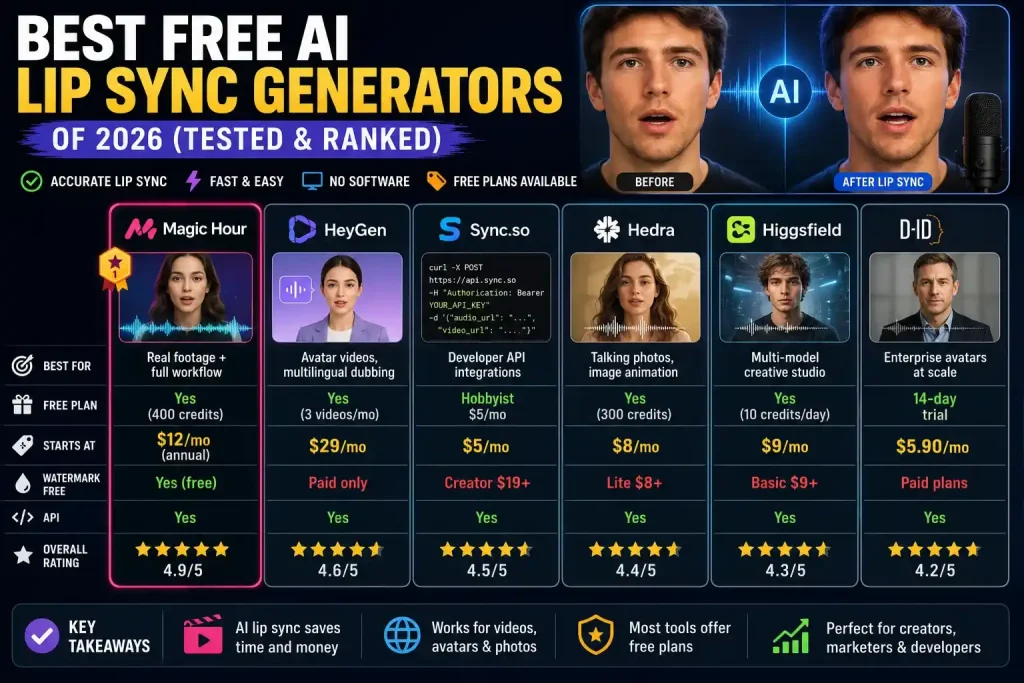
| Tool | Best For | Free Plan | Starts At | Watermark-Free | API |
| Magic Hour | Real footage + full workflow | Yes (400 credits) | $12/mo (annual) | Yes (free) | Yes |
| HeyGen | Avatar videos, multilingual dubbing | Yes (3 videos/mo) | $29/mo | Paid only | Yes |
| Sync.so | Developer API integrations | Hobbyist $5/mo | $5/mo | Creator $19+ | Yes |
| Hedra | Talking photos, image animation | Yes (300 credits) | $8/mo | Lite $8+ | Yes |
| Higgsfield | Multi-model creative studio | Yes (10 credits/day) | $9/mo | Basic $9+ | Yes |
| D-ID | Enterprise avatars at scale | 14-day trial | $5.90/mo | Paid plans | Yes |
Pricing verified from official sources, 2026.
What to Look for in an AI Lip Sync Tool
Not every lip sync tool solves the same problem. The gap between a tool that looks good in a demo and one that survives real production is wider than most comparison articles admit.
Here are the factors I weighed while testing.
- Phoneme accuracy. The mouth must shape correctly for each sound, not just open and close in rhythm. Plosives (P, B, T) and fricatives (F, V, S) are the hardest to render. Good tools handle them without visible artifacts.
- Stability on longer clips. Many tools drift out of sync past 60 seconds. If you produce anything longer than a social clip, test your actual length first.
- Real footage vs. avatars. These are different technical problems. Avatar-first tools often stumble on recorded video of real people, and vice versa.
- Language support. Verify which languages a tool was trained on, not just which ones it claims to support. Quality varies by language even inside the same product.
- Free tier reality. Most “free” plans cap output to a few seconds, add watermarks, or block commercial use. I checked the actual terms, not the marketing copy.
The right tool depends on whether you are syncing real footage, animating a photo, or building lip sync into an app.
The 6 Best Free AI Lip Sync Generators of 2026
1. Magic Hour — Best Overall for Real Footage Lip Sync
Magic Hour is an AI video platform that combines lip sync, face swap, talking photos, and a full set of video tools in one browser workspace. After two weeks of testing, it was the most reliable option for creators and marketing teams working with real recorded footage.
What separates it from avatar-focused tools is that its lip sync is built for real video. I took an existing clip of a person speaking, swapped in a new voiceover, and got accurate mouth movement across every frame. That workflow is harder than it looks, and most tools compromise on it. Magic Hour did not.
The free tier is the reason it tops this list. You get 400 credits, no watermark, and no credit card required. You can even run a quick sync with no signup required to try. You can test its free AI lip sync directly in the browser before creating an account.
See also SFM Compile Explained: The Complete Guide to Compiling Models for Source Filmmaker
Pros
- Accurate lip sync on real footage — handles dialogue, accents, and pacing shifts reliably
- Face swap and lip sync in one pipeline, no tool switching
- Runs on desktop and mobile from a browser — no download, no GPU
- Generous free tier: 400 credits, no watermark, no credit card
- Credits never expire, and paid plans allow parallel generations
- Weekly feature releases and full API parity across every tool
- Founder-level support responses; trusted by teams at Meta, NBA, and L’Oreal
Cons
- Quality drops on extreme head angles (full profiles past 70–80 degrees)
- Focused on realistic human faces — stylized animation is not supported
If you want one tool that handles real footage, dubbing, and combined face-swap workflows, this is hard to beat. For most creators and marketers, Magic Hour is the strongest free AI lip sync generator available in 2026.
Pricing
- Free: 400 credits, no watermark, no credit card required
- Creator: $19/mo, or $12/mo billed annually ($144/yr) — 144,000 credits/yr, 1024px, commercial use, 3 concurrent generations
- Pro: $39/mo, or $25/mo billed annually ($300/yr) — 300,000 credits/yr, 1472px, 5 concurrent generations
- Business: $99/mo, or $66/mo billed annually ($792/yr) — 840,000 credits/yr, 4K, unlimited concurrent generations
2. HeyGen — Best for Avatar Videos and Multilingual Dubbing
HeyGen is the leading platform for avatar-based video. It generates talking-head videos from a text script, applying lip sync to a library of 700+ stock avatars or a custom avatar built from your footage.
Its standout strength is language coverage. HeyGen supports 175+ languages and can translate an existing video into a new language with matched lip movement. For teams running global campaigns, that is its most valuable feature.
The tradeoff: it is built for avatars, not real footage. When I tested it on a real recorded clip, it hit limits fast. The free plan is evaluation-only too.
Pros
- Excellent lip sync accuracy on avatar speaking videos
- 175+ languages for translation with matched mouth movement
- 700+ stock avatars plus custom avatar creation
- API access and strong enterprise features (SOC 2, SSO, team workspaces)
Cons
- Free plan is evaluation-only: 3 videos/month, watermarked, 720p
- Built for avatars — real footage performance is secondary
- Collaboration requires the Business plan ($89/mo minimum)
If your work centers on multilingual avatar videos rather than real footage, HeyGen is the clear pick. For real recorded clips, look elsewhere.
Pricing
- Free: 3 videos/month, watermarked — evaluation only
- Creator: $29/mo (or $24/mo annual) — unlimited videos, 1080p, watermark-free
- Business: $89/mo ($72/mo annual) — 4K, team workspace, API
- Enterprise: Custom — SSO, dedicated support, SLA
3. Sync.so — Best API-First Lip Sync for Developers
Sync.so, from Synchronicity Labs, is a lip sync engine built for developers rather than a creative platform. If you are integrating lip sync into a product or automated pipeline, this is where I would start.
Its Lipsync-2 model supports up to 4K resolution across multiple languages, with voice cloning, active speaker detection, and batch processing depending on plan. The per-second pricing is honest for teams that need predictable cost modeling.
There is also a no-code Lipsync Studio. It is genuinely good, though less polished as a self-serve creative tool than Magic Hour or HeyGen.
Pros
- Strong API with SDKs, batch processing, and clean documentation
- Usage-based pricing — predictable costs at scale
- Up to 4K resolution on supported plans
- Voice cloning and active speaker detection from the Creator tier
Cons
- UI is functional, not creative-first
- Per-second charges stack on top of the monthly fee — budget carefully
- Watermark on the Hobbyist plan; removed at Creator ($19/mo)
If you are a developer building lip sync into an app, the transparent per-second billing makes Sync.so the most cost-predictable option here.
Pricing
- Hobbyist: $5/mo + $0.05/sec — 1 min max, 1 concurrent job, API access
- Creator: $19/mo + $0.05/sec — 5 min max, no watermark, voice cloning
- Growth: $49/mo + $0.0475/sec — 10 min max, 6 concurrent jobs
- Scale: $249/mo + $0.04/sec — 30 min max, batch API, 20% usage discount
4. Hedra — Best for Talking Photos and Image Animation
Hedra’s Character-3 model is the current benchmark for talking-photo animation. Feed it a still image and it generates a video where the subject speaks, with synchronized lip movement, expressions, and head motion.
Unlike avatar libraries, Hedra animates your own uploaded photo — any person, illustration, or character. That flexibility makes it a favorite for creative and branded work where you need a specific face.
See also Voomixi com Review (2026): Is It Safe, Legit, or a Scam?
The free plan is a legitimate way to test quality, though outputs carry a watermark and commercial use needs a paid tier.
Pros
- Character-3 leads on expressiveness for talking photos
- Animates any uploaded image, not just stock avatars
- Voice cloning from the Creator plan
- Fast generation — most short clips render in under 2 minutes
Cons
- Maximum 720p — no 1080p or 4K on any plan
- Free plan can be disabled during high demand and blocks commercial use
- Less suited to real recorded footage
If you build spokesperson or character content from still images, Hedra is the most flexible option I tested.
Pricing
- Free: 300 credits/month (~50 sec of 720p), watermarked, no commercial use
- Lite: $8/mo — 1,000 credits, commercial use, watermark-free
- Creator: $24/mo — 4,000 credits, voice cloning
- Professional: $60/mo — 12,000 credits, priority generation
- Enterprise: Custom — volume pricing, private deployment
5. Higgsfield — Best Multi-Model Studio with Native Lip Sync
Higgsfield is a multi-model AI video platform that bundles access to Sora 2, Veo 3.1, Kling 3.0, and WAN 2.6 under one subscription, with a native Lipsync Studio built in. If you want video generation and lip sync in a single workspace, it is the broadest option here.
It rewards creative control. Features like Cinema Studio presets, Soul ID for consistent characters, and 70+ VFX templates give it depth simpler tools lack. But that depth burns credits fast — premium models cost 40–70 credits per generation.
Pros
- Access to Sora 2, Veo 3.1, and Kling 3.0 — best model breadth on this list
- Native Lipsync Studio inside the generation workflow
- Soul ID keeps character identity consistent across shots
- 70+ cinematic presets and API access
Cons
- High credit burn on premium models
- Free plan gives only 10 credits/day — barely enough to test
- Support responsiveness can be inconsistent at this price
For pure lip sync on real footage, Magic Hour and Sync.so outperform it. Higgsfield earns its spot on creative breadth — it suits creators who want everything in one place.
Pricing
- Free: 10 credits/day, limited model access
- Basic: $9/mo — 150 credits, expanded models
- Pro: $29/mo — 600 credits, all models plus Lipsync Studio
- Ultimate: $49/mo — more credits, higher concurrency
- Creator: $119/mo — 6,000 credits, maximum concurrency
6. D-ID — Best for Enterprise Avatar Deployment at Scale
D-ID is one of the longest-running platforms in AI avatar video, now on its V4 architecture. Its Expressive Visual Agents serve two needs: scripted enterprise video and real-time conversational avatars with sub-0.5-second latency.
The V4 lip sync is strong for avatar content, with 119 languages across many accents. For enterprises with strict data handling and compliance requirements, D-ID’s SOC 2 infrastructure makes it more defensible than most consumer tools.
Pros
- Sub-0.5s latency for real-time conversational avatars
- 119 languages across scripted and conversational content
- Enterprise-grade: SOC 2, SSO, dedicated support
- Lowest entry price here at $5.90/mo, with API on all plans
Cons
- Free access is a 14-day trial only — no ongoing free plan
- Lite plan locks premium presenters behind higher tiers
- Primarily an avatar platform, not a real-footage tool
If you need compliant, multilingual avatar video at scale or real-time conversational agents, D-ID is built for that use case.
Pricing
- Free Trial: 14 days, watermarked output
- Lite: From $5.90/mo — basic avatars, standard presenters, API
- Pro: Premium 1080p presenters, voice cloning
- Advanced: Higher volume, 3 cloned voices, priority processing
- Enterprise: Custom — SSO, SLA, dedicated support
How We Chose These Tools
I started with more than 20 lip sync tools and cut the list down to six that held up in real use.
Every tool ran the same test set. I used a real talking-head clip, a translated-audio dubbing task, a still-photo animation, and, where an API existed, a scripted integration test.
I graded each on four things:
- Accuracy on hard sounds like plosives and fricatives
- Stability on clips longer than 60 seconds
- Free-tier value based on actual terms, not marketing claims
- Workflow fit for creators, marketers, and developers
I ran each generation more than once to check consistency, since a single lucky output tells you little. Pricing was verified against each provider’s official page at the time of writing.
No tool here made the list on features alone — each one earned it in testing.
AI Lip Sync Market Trends in 2026
The category has shifted fast, and a few patterns stand out this year.
Real footage is the new battleground. Early tools focused on avatars because synthetic faces are easier to control. The harder problem — syncing real recorded people — is now where the strongest tools compete.
See also Unbanned G+ Explained (2026): Safe or Risky? Complete Guide
All-in-one platforms are winning. Creators are tired of stitching together separate tools for voice, video, and sync. Platforms that combine lip sync with face swap, talking photos, and image-to-video are pulling ahead.
Free tiers are getting more honest. Watermarks and hard caps still exist, but a handful of providers now offer genuinely usable free plans. That pressure is reshaping expectations across the market.
API-first products are growing. As teams automate content at scale, per-second and usage-based pricing is replacing rigid credit systems for developer workflows.
Watch for newer entrants like LatentSync and LipDub, which are pushing open and low-cost approaches worth tracking through the year.
Final Takeaway
Choosing the right tool comes down to what you are actually syncing.
- Real footage, dubbing, or combined face-swap work: Magic Hour. The generous free tier and real-video accuracy make it my top pick.
- Multilingual avatar videos: HeyGen, with 175+ languages.
- Developer or product integration: Sync.so, for transparent per-second billing.
- Talking photos from still images: Hedra and its Character-3 model.
- Multi-model creative studio: Higgsfield, for breadth in one place.
- Enterprise avatars and compliance: D-ID, with SOC 2 and 119 languages.
No single tool wins every use case, and quality still varies by footage, language, and clip length. Test your own content on the free plans before committing. Start with Magic Hour’s free tier — it costs nothing and needs no signup to try.
Frequently Asked Questions
What is the best free AI lip sync generator in 2026?
Magic Hour offers the most generous free plan I tested — 400 credits, no watermark, and no credit card required. Hedra’s 300 free monthly credits are watermarked and block commercial use, while HeyGen’s free plan is limited to three watermarked videos a month.
What is the difference between lip sync and video dubbing?
Lip sync is the technical step of matching mouth movements to audio. Dubbing is the broader workflow: translating the script, generating new audio, then applying lip sync. Tools like HeyGen and D-ID handle full dubbing, while Magic Hour and Sync.so focus on the sync layer you pair with any translated audio.
Do AI lip sync tools work on videos where the person is moving?
Yes, within limits. These tools track face position across frames, so moderate head movement works fine. Quality drops on full-profile shots, fast jerky motion, or frames where hands cross the face. Trim those sections before processing for the best result.
Can I use AI lip sync videos commercially?
On paid plans, yes — content you own or license is fine for commercial use across every tool here. The legal risk comes from applying lip sync to real people without consent. Most platforms prohibit this, and synthetic-media laws are expanding, so always get consent from anyone whose face or voice you modify.
How accurate is AI lip sync in 2026?
For clear, front-facing footage in major languages, the best tools produce results that are hard to distinguish from real video in casual viewing. Artifacts still show up on rapid consonants, unusual accents, and profile angles. For high-scrutiny work, plan to review outputs — no tool is perfect on difficult content every time.